Pro Roles: One Pro, Every Hat They Wear
Your pros rarely do just one job. In DiveCrewPro an instructor can also work as a divemaster, and an optional Assistant Instructor role lets AIs lead the courses they're qualified to teach—like a Refresher or Peak Performance Buoyancy.
Start 60-Day Free TrialStaff the Way Your Shop Really Works
A pro's certification level and the role they fill on a course are two different things. DiveCrewPro keeps them separate, so the right people show up for the right slots.
Give a Pro More Than One Role
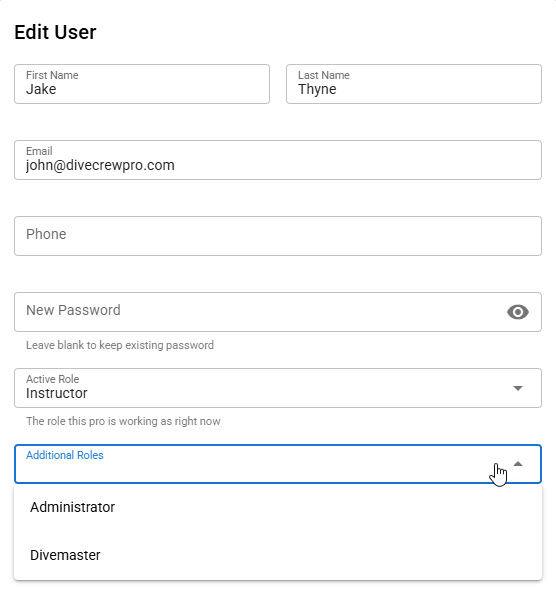
Admins open a pro in Pros Management, set the role they're working as right now, and add Additional Roles—Administrator, Instructor, Assistant Instructor, or Divemaster. The pro shows up in the staff lists, schedule pickers, and email groups for every role they hold.

See Every Role at a Glance
The Pros Management list has a Roles column, so admins can see who holds which roles without opening each profile.
Switch Roles in One Click
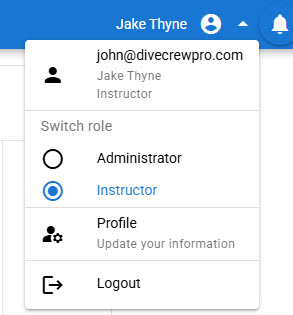
A pro with several roles picks the one they're working as from their profile menu. Menus and permissions follow the active role, so an owner who also teaches can go from running the shop to working as an instructor without a second login.
Add the Assistant Instructor Role
Turn on the Assistant Instructor role in Settings when your shop uses AIs. Assistant Instructors get the same pro portal as instructors and divemasters—schedule, requests, dashboard, roster import—plus their own group in Send Email. Shops that don't use AIs never see it.
Choose Which Courses AIs Can Teach
Each class type has an "Assistant Instructor Can Teach" checkbox. Tick it on courses like Refresher, Peak Performance Buoyancy, or Emergency Oxygen Provider, and AIs appear in that class's instructor picker and can request to lead it. Everything else stays instructor-only.
The Right Pro in Every Slot
Multiple roles and the Assistant Instructor role let you schedule your crew the way they actually work—without duplicate accounts or workarounds.
Start 60-Day Free TrialSee also: scuba pro portal, scuba instructor scheduling, and pro blackout dates.